
Coming soon to this site
SUNMI POS terminals with FacturaONE
The SUNMI D3 MINI is the first POS terminal in our range for shops. It brings the FacturaONE till, a customer display and a receipt printer together in one countertop unit.
You’ll soon be able to buy the terminal on this website. If you’re setting up your shop’s checkout, get in touch and we’ll help you get started.
Ask about availability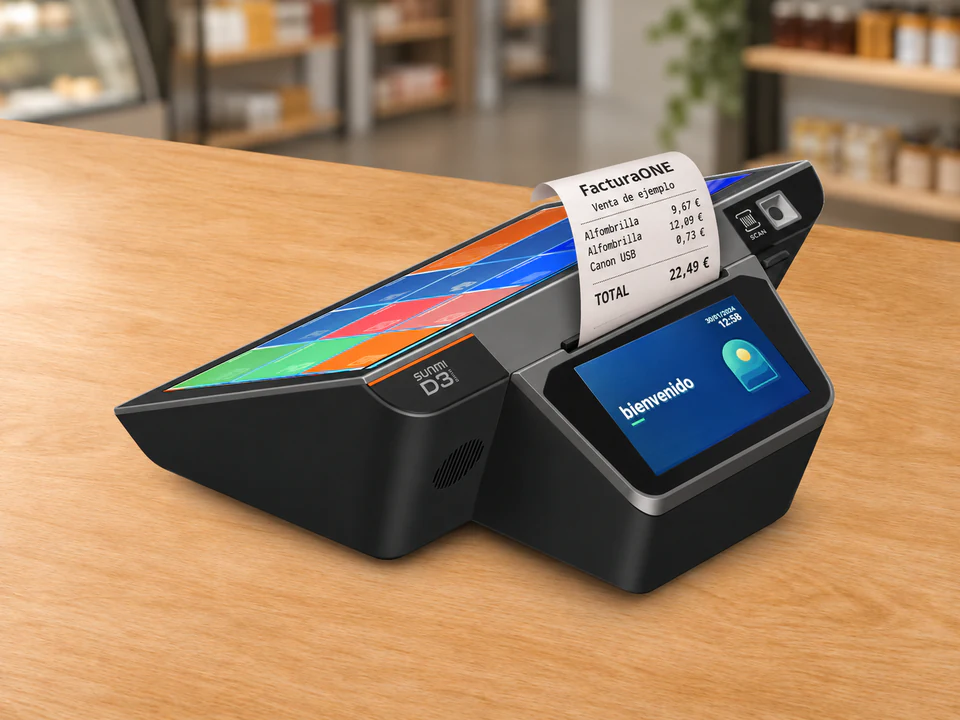
How the SUNMI D3 MINI works in your shop

From catalogue to checkout
From the FacturaONE menu, you can look up customers and items or open the till to ring up a sale.

The customer’s view
Tap items in the catalogue or scan their barcodes. As you check the sale at the till, the customer sees each item and the total on their own display.
Using FacturaONE at the till
Set up your catalogue
Group products by category so they are easy to find on the touchscreen. In a clothes shop, you can select one garment from its category and scan the label on another to add both to the same sale.
Check the sale before taking payment
If a customer wants two units or changes their mind, open the receipt line and adjust the quantity before taking payment. They can follow their purchase on the color customer display as you ring it up.
Cash up at the end of the day
Look through recent sales to find a receipt. At the end of your shift, run the Z report to review till activity and check the cash takings against the cash in the drawer.
Sales and VAT reports for your shop
Report to help prepare your VAT return
Generate a report with the VAT data for the period. Use it to help prepare your return or share it with your accountant.
Sales reports by period
Run daily, monthly, quarterly, and annual sales reports. See how much you sold in each period and track how your shop is performing over time.
POS with VERI*FACTU and electronic invoicing
VERI*FACTU from day one
Included in your FacturaONE subscription. Once your tax setup is complete, FacturaONE automatically sends records for the receipts and invoices you issue through the POS to the Spanish Tax Agency (AEAT).
Electronic invoicing for public authorities
If you invoice a Spanish public authority, the Company plan lets you issue electronic invoices for submission through FACe.
Print receipts directly from the till
When you complete the sale, record the payment method in FacturaONE and print the receipt. The paper comes out at the top of the D3 MINI, ready to hand to the customer.
The built-in printer cuts receipts automatically so you can hand them out one after another.

SUNMI D3 MINI specifications
The compact SUNMI D3 MINI combines a touchscreen, a color customer display, and a thermal receipt printer with an automatic cutter.
SUNMI product specifications- Main display
- 10.1-inch IPS touchscreen with a resolution of 1280 × 800 pixels.
- Customer display
- 4-inch IPS color touchscreen.
- Built-in thermal printer
- Up to 250 mm/s with an automatic receipt cutter.
- Processor
- Qualcomm six-core processor, up to 2.4 GHz.
- Memory
- 3 GB of RAM and 32 GB of storage.
- Operating system
- SUNMI OS based on Android 13.
- Built-in scanner
- Scans 1D barcodes and 2D codes.
- Connectivity
- Dual-band Wi-Fi, Bluetooth 5.0 and Ethernet.
- Countertop connections
- Three USB Type-A ports and an RJ12 port for a cash drawer.
Before you set up your SUNMI POS terminal
How much counter space do I need?
The terminal is 25 cm wide, 23.1 cm deep, and 10.8 cm high. Leave room for the cables and for opening the cover when changing paper.
Do I need a separate barcode scanner?
The D3 MINI has a built-in scanner. A wireless handheld scanner can be easier to use with bulky items. If you already have one, tell us the model so we can check compatibility.
How do I connect the terminal and cash drawer?
Connect the terminal to your shop network over Wi-Fi or with an Ethernet cable. For the cash drawer, check that it is compatible with the D3 MINI’s RJ12 port.
Can I buy the terminal with FacturaONE yet?
We’ll announce the sales launch on this page. In the meantime, you can try the till in the demo and check the software pricing. If you already use FacturaONE, tell us which peripherals you have so we can help you choose a suitable setup.
